
Quick answer
Grow a Garden codes are redeemed through the game’s own code menu. Copy one active code exactly as shown, paste it into the official in-game field, and confirm the reward before trying another. Normal redemption does not require a Roblox password, browser cookie, external download, or survey.
Redeemable codes
Copy a code exactly as shown, then paste it into the game’s official code box.
STORY500 Seeds NEWSTARBUD750 Seeds NEWRDCAward1x RDC Award cosmeticBEANORLEAVE101x Green Bean Chamber cosmetictorigate1 Whispering ToriiLUNARGLOW10Free rewards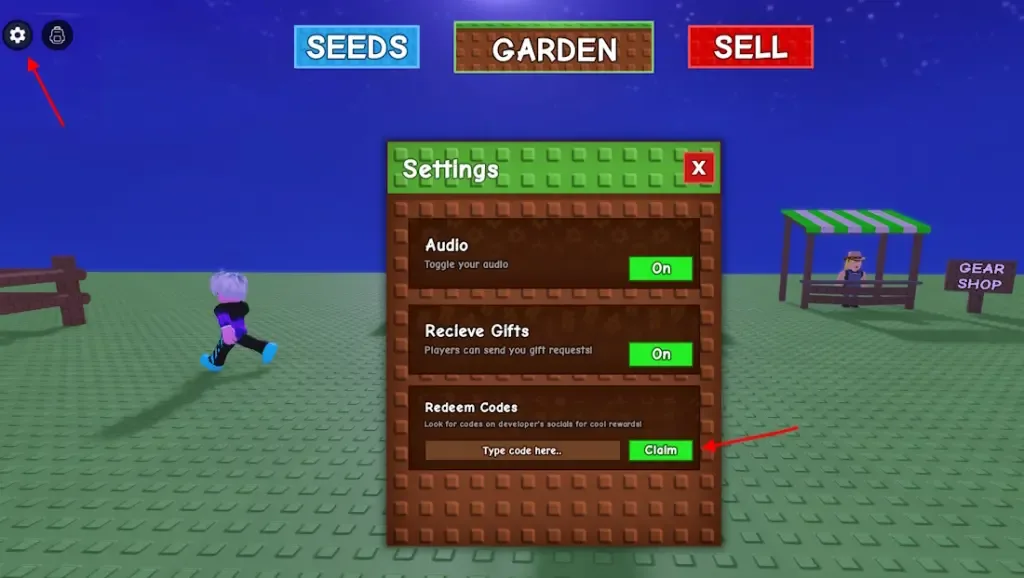

What to check
- Use only the code field inside the official Grow a Garden experience.
- Copy uppercase and lowercase letters exactly as displayed.
- Redeem one code at a time and confirm the reward message.
- Ignore outside pages that request passwords, cookies, downloads, or surveys.
What to do next
- Launch Grow a Garden from its official Roblox experience page.
- Open the in-game settings or codes menu.
- Copy one active code from the list and paste it into the code field.
- Submit the code once and wait for the reward confirmation.
- If it fails, check spelling, expiration status, and whether it was already redeemed.
Safer path
Use official Roblox pages, official app-store purchase flows, recognized retailers for gift cards and the official in-game code box for a specific Roblox experience. If a page tries to move the claim into a password form, QR scan, cookie request, APK, extension or survey wall, close it.
Simple rule: Roblox rewards do not require secret account information on an unofficial page.
FAQ
Where are Grow a Garden codes redeemed?
Use the official code field inside Grow a Garden. You should not need to sign into a separate reward website.
Why did a Grow a Garden code fail?
The code may be expired, already redeemed, or entered with the wrong capitalization or an extra space.
Are Grow a Garden codes safe to copy?
A code itself is plain text. Enter it only inside the official game and never provide a password, cookie, or verification code.